
Keep silica training and exams up to date
Track OSHA silica training, medical exams, fit tests and air samples for each worker, and see what is expired or due in the next 30 days.
Cutting quartz and granite puts your crew under OSHA's respirable crystalline silica standard. The silica program keeps every worker's training, medical exams, fit tests and air samples in one place, with the due dates worked out for you.
Before you start
- The silica program needs the Pro plan (Silica Compliance).
- Only Owners, Admins and Office users can open it.
- Add your workers on Settings → Team first. People who don't use SlabBoard can be typed in by name.
- Open it from Compliance → Silica program.
Record types and due dates
When you pick a type and a date, SlabBoard fills in the next due date:
| Type | Due again |
|---|---|
| Silica Hazard Training | 12 months |
| Medical Surveillance Exam | 36 months |
| Respirator Fit Test | 12 months |
| Exposure Monitoring (Air Sample) | 6 months if the result is 25 µg/m³ or more, otherwise 12 months |
| Written Exposure Control Plan | No due date. Company-wide, no worker. |
| Other | No due date |
Add a record
- Click Add record.
- Pick the Type.
- Pick the Worker from your team, or type a Worker name (if not a user).
- Set Date performed. Expires / due again fills in. Change it if needed.
- Add the Result (for example "Passed, cleared for respirator use") and the Provider (clinic, trainer or lab).
- For an air sample, enter Exposure (8-hr TWA) µg/m³.
- Attach the Certificate / report (PDF or photo, up to 10 MB).
- Click Create.
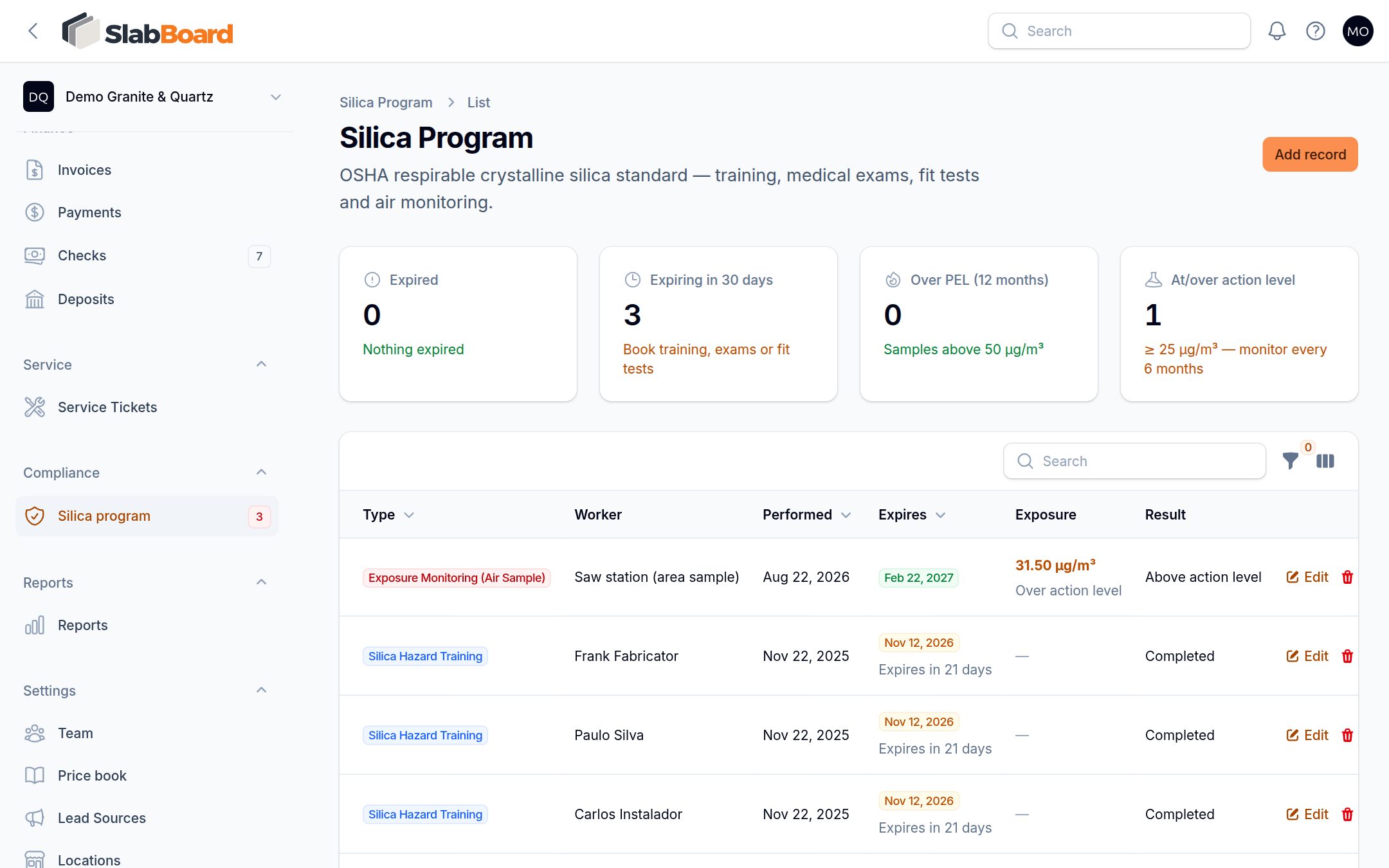
See what needs attention
Four boxes at the top of the page:
| Box | What it counts |
|---|---|
| Expired | Records past their due date. Renew now. |
| Expiring in 30 days | Book the training, exam or fit test. |
| Over PEL (12 months) | Air samples above 50 µg/m³ in the last year. |
| At/over action level | Air samples at 25 µg/m³ or more. Monitor every 6 months. |
The red number next to Silica program in the menu counts records that are expired or expire within 30 days.
In the list, the Expires column shows Expired in red, Expires in N days in amber, or the date in green. The Exposure column flags Over action level and Over PEL.
Use the filters Expired or expiring (30 days) and At or over action level for a quick to-do list.
Renew a record
- Click Add record. Don't edit the old one.
- Pick the same type and worker, with the new date.
- Attach the new certificate and save.
The old record stays as history. The menu number, the alert boxes and the Expired or expiring filter stop counting it.
Good to know: The old record's Expires badge still says Expired after you renew. That's expected: the new record is the one that counts.
Important: SlabBoard doesn't send reminder emails for silica records. Check the menu badge or the alert boxes, for example once a week.
Click File on a row to open the attached certificate.
Related
Still stuck?
Write to us and a real person will answer. [email protected]